Mobile Tap
Put the next step on every seat.

Church tap tags: NFC and QR on one sticker. Tap or scan, and your hub opens on their phone: one page with the buttons you choose.
A sticker people tap with their phone. They can ask for prayer, sign up, or fill in a connection card before the moment passes.
Starts after a 30-day trial. No setup fee. No cancellation fee.
Works on every modern phone · No app to install
Watch the demo
See it in 42 seconds.
Sticker to hub
Hold the phone to the sticker. That’s the whole thing.
No app, no account, no searching for a link. Your hub opens on their phone, with the buttons you chose, in your church's brand.
Why the seat matters
The response happens in the room, or it doesn’t happen.
The sermon lands and someone decides to act. By the time they find your website or remember the QR slide, the moment has passed. A church tap sticker puts the response inches from their hand.
Ask for prayer
One tap opens your church’s own prayer request page.
Sign up
Events and serving. Each button opens the sign-up page you choose.
Connect
A first-time guest can fill in your connection card without finding a pen.
Yours to change
When Sunday changes, the stickers don't have to.
New series, new sign-up: change a button, publish, and every sticker in the room opens the new version. A QR generator and a link page send people to a list. Mobile Tap is a full builder, and every tap is recorded against the campus it came from.
Choose your buttons: connection card, prayer, events, sermons, volunteer sign-up, your website and your own links
Pick each button’s icon and label from a curated set, no design skills needed
Always current: reads from the same Steeple profile as your website
See how many taps your hub had this month, and how often each batch of stickers was tapped
NFC stickers for seats, pews and the welcome desk
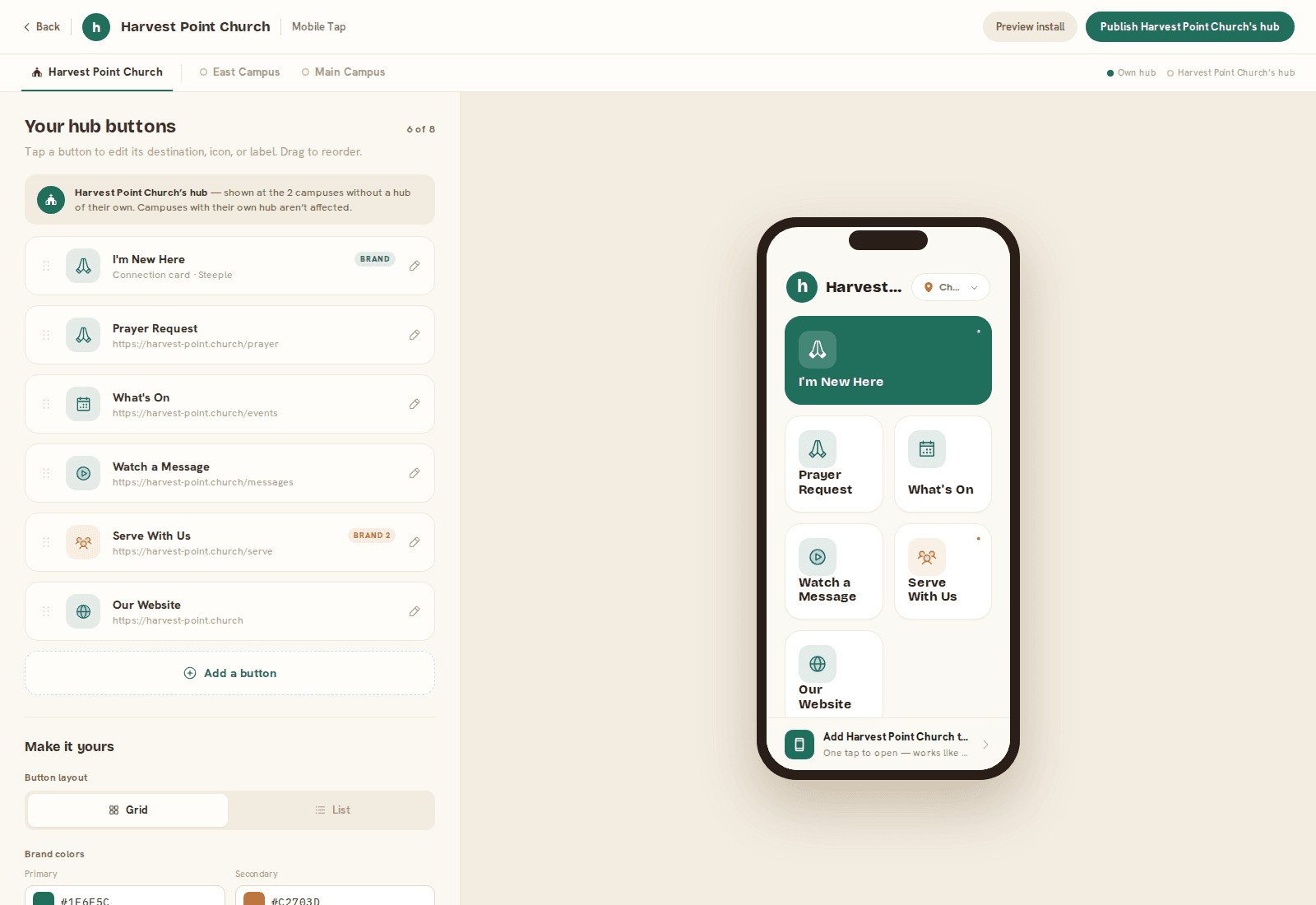
The builder and the live hub it publishes.
The part a QR code can’t do
The sticker knows which campus it’s on.
A tap at your Westside campus files that connection to Westside, and starts Westside’s follow-up. A plain QR code pointing at a page has no idea where it was scanned, so the card arrives with no campus on it and someone works it out by hand.
“Someone, somewhere, tapped something.”
“Westside campus, assigned to Westside’s follow-up team.”
Your stickers
What’s in every Mobile Tap sticker
Made to stay on the seat, and to know which campus it’s in.
- Your church’s design on every sticker. Drawn to our template by your designer, or built by us from your logo and colors.
- A tap that knows the campus. Each sticker is coded to its campus, so every card arrives marked with the campus it came from and starts that campus’s follow-up.
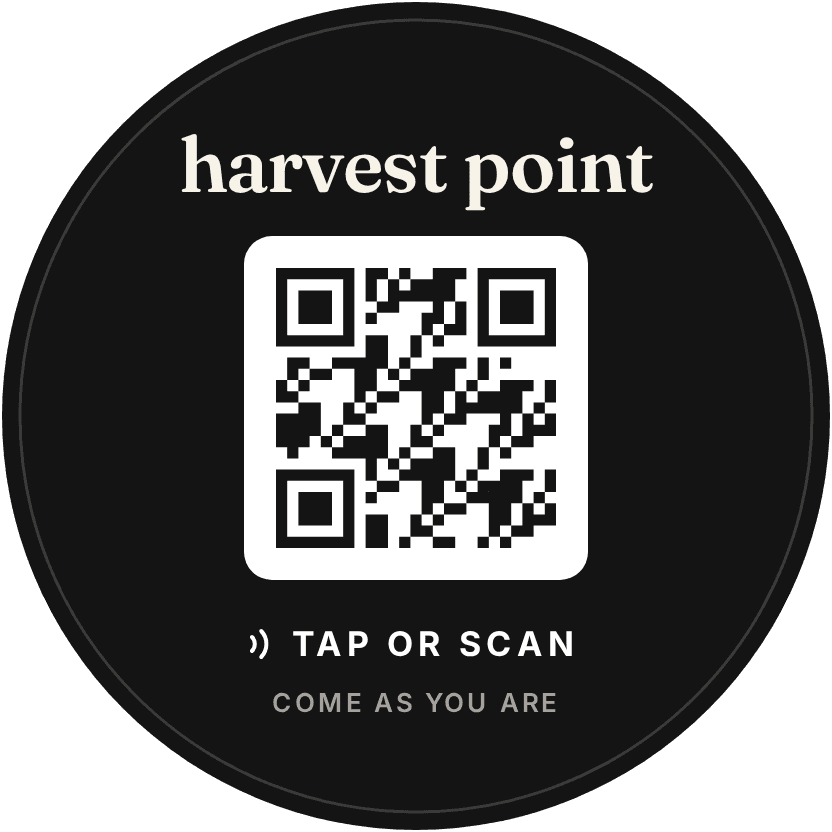
- Built for seat backs. A 100 mm circle with a waterproof plastic face, matte finish and 3M 467 adhesive. Several churches already use this same sticker on fabric seating.
- Checked before it ships. Every run is printed 10% over, and any sticker that fails the quality check is pulled before your order leaves.
For fabric seating and other non-metal surfaces.
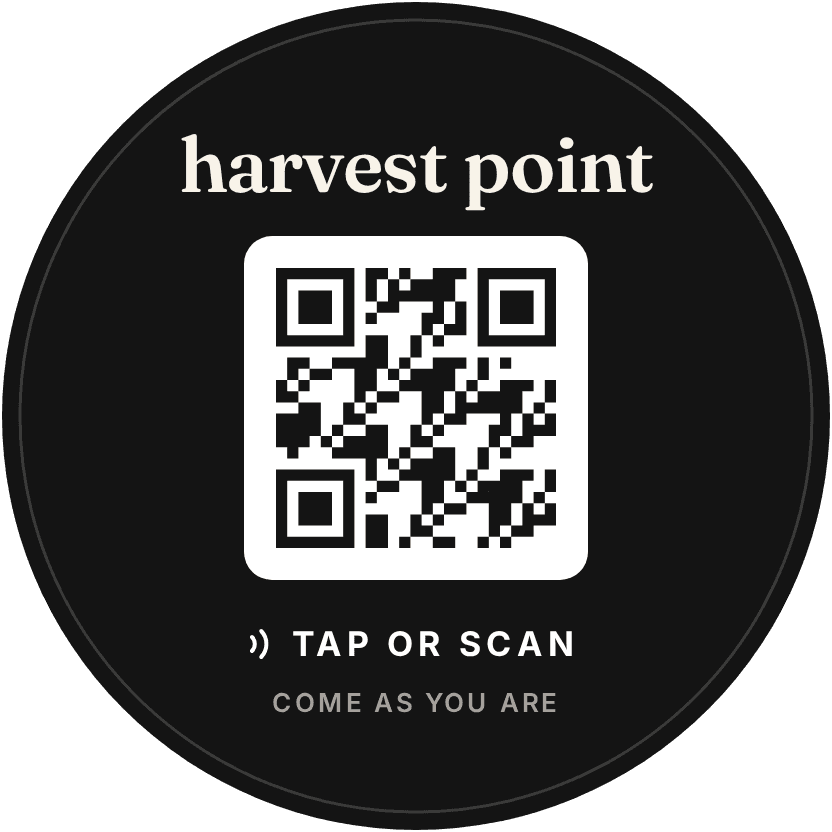
NFC and QR on one sticker. This sample is for Harvest Point, a made-up church, so its code opens nothing.
Better together
A tap is the same as a card, filled in faster.
Add Connection Card and the website, and every route into your church lands in one queue, with the campus already on it.
Website
Someone finds you Sunday morning and sees the right service time.
Hub
They tap the sticker on the seat and your hub opens on their phone.
Cards
Paper or digital, the hand-raise is captured and reviewed in one queue.
One profile
With Connection Card, a tap ends as a reviewed connection in Planning Center.
NFC and QR stickers on the seats: what churches ask.
What are church tap tags?
Small stickers with an NFC chip inside. Hold a phone to one and a web page opens, with no app to download. Churches put them on seats, pews and the welcome desk. Each Mobile Tap sticker also carries a QR code for phones that cannot tap, and either way it opens your church’s own hub.
Can we put NFC tags on our church chairs?
Yes, and the chair backs are a good place for them: the sticker sits inches from someone’s hand at the moment they decide to respond. The same sticker works on a seat back, a pew or the welcome desk. Keep them off metal, because the tap does not work there.
How many stickers do we need?
Enough that every seat can reach one. One on every chair back is the simplest rule, and one on every second chair still leaves every seat in reach. Add one at the welcome desk for anyone who walked past the seats.
How big are the stickers?
100 mm round, about four inches, with the chip inside and a QR code printed on the front.
Do they need a battery, and how long do they last?
No battery, and nothing to charge: the chip runs on the phone that taps it, and the face is waterproof plastic. We don’t put a number of years on them.
Can someone rewrite a sticker?
No. Every sticker is locked before it ships, so nobody can change it with a phone. That also means it stays on Steeple’s address and can’t be pointed at another service.
Who designs the stickers?
We can, in your colors and with your logo, or your own designer can. Either way, you sign off a final proof before anything prints.
Do we have to re-program the tags when the link changes?
No. A tag is awkward to rewrite once it is stuck to a chair, so the standard advice for any NFC tag is to write a link you control, never the final destination. That is how these work: every sticker opens your hub, so you change your hub, never the sticker. Change a button and publish, and every sticker in the room opens the new version. It does not follow your slides or switch on a timer: someone on your team makes the change.
What do people land on when they tap?
Your church’s own hub: one page in your church’s brand, with up to eight buttons you choose, such as a connection card, prayer, events, sermons and your website. It opens straight in the phone’s browser, with no app to download, and you change the buttons yourself whenever you like. It is a real destination for your church, not a list of links.
Does it work on every phone?
Any phone with a camera can scan the QR code, and most recent phones can simply tap. Some people have NFC switched off, and some older phones cannot read a tag at all, which is why the QR code is on the same sticker. Whichever way someone uses it, they land on the same page.
Does the person tapping need an app or an account?
No. A tap opens your hub in the phone’s browser, with nothing to download and nothing to sign in to.
Can it tell which campus someone tapped at?
Yes, and it is the one thing a QR generator and a link page cannot do. Each sticker carries its campus on both the chip and the QR code, so a tap or a scan at your Westside campus files that connection to Westside and starts Westside’s follow-up. A plain QR code pointing at a page has no idea where it was scanned, so the card arrives with no campus on it and someone works it out by hand.
What can we see about taps?
How many taps your hub had this month, on the hub page, and how often each batch of stickers was tapped, in your Mobile Tap settings.
Why not buy blank NFC tags?
You can, and blanks cost less per sticker. You would write and lock every tag yourselves, build the page it opens, and still not know which campus a tap came from.
What does the $49 a month pay for?
Your church’s hub and everything behind it: the builder, your branding, your own pages, and as many taps as you like, each tied to its campus. The sticker is the way in, and the hub is what you keep changing. Starts after a 30-day trial. Stickers sold separately. No setup fee. No cancellation fee.
Do we need Planning Center, or any other software?
No. A church can hold Mobile Tap and nothing else: no Planning Center, no other church software and no other Steeple product. $49/mo for Mobile Tap, after a 30-day trial. Stickers sold separately.
Do taps reach Planning Center?
With Connection Card, yes: a tap ends as a reviewed connection in Planning Center. Mobile Tap on its own is the hub and the stickers, with no Planning Center sync.
What happens to the stickers if we stop paying?
The stickers pause. A tap or scan shows a short notice with your church’s name until you pay again, and the first tap after that opens your hub as before. Your hub itself stays on at its own address, and nothing you built is deleted.
Pricing
On its own, or as part of the system.
Mobile Tap is $49 on its own: the Tap Builder and as many taps as you like. Stickers sold separately. All three products together are $199, at the founding rate, locked for life.
Mobile Tap
Starts after a 30-day trial. Stickers sold separately. No setup fee. No cancellation fee.
Start Mobile TapPut the next step on every seat.
$49/mo for Mobile Tap, after a 30-day trial. Stickers sold separately. No setup fee. No cancellation fee.